You can easily dispaly your own HTTP 404 Page Not found Error page for each of your SharePoint Web Application. A custom Error page can be associated with each Web Application in SharePoint and you can redirect the 404 error page to your own specified error page.
SharePoint has it's error Pages stored at this location:
14\TEMPLATE\LAYOUTS\1033\ERRORV4.html
14\TEMPLATE\LAYOUTS\1033\sps404.html
The one we need is the sps404.html. If you open this page you will see:
STSNavigate("/_layouts/spsredirect.aspx?oldurl="+ requestedurl);
Here spsredirect.aspx is the Error page currently used by sharepoint. So what we need to do is, first make a copy of the sps404.html, rename it - in my case mscom404.html and save it at the same location (14\TEMPLATE\LAYOUTS\1033).Now in the STSNavigate replace spsredirect.aspx with your own aspx page.

The url in STSNavigate should be a properly working url, then only the redirection will work. as you can see in the code above, i'm placing my error page in the root site's Pages library.
SharePoint has it's error Pages stored at this location:
14\TEMPLATE\LAYOUTS\1033\ERRORV4.html
14\TEMPLATE\LAYOUTS\1033\sps404.html
The one we need is the sps404.html. If you open this page you will see:
STSNavigate("/_layouts/spsredirect.aspx?oldurl="+ requestedurl);
Here spsredirect.aspx is the Error page currently used by sharepoint. So what we need to do is, first make a copy of the sps404.html, rename it - in my case mscom404.html and save it at the same location (14\TEMPLATE\LAYOUTS\1033).Now in the STSNavigate replace spsredirect.aspx with your own aspx page.

The url in STSNavigate should be a properly working url, then only the redirection will work. as you can see in the code above, i'm placing my error page in the root site's Pages library.
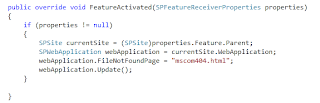
The next step is to set mscom404.html as the 404 redirection page for your specific web application. we are accomplishing this by creating a custom404 feature and as the feature activates, it sets the FileNotFoundPage to the mscom404.html.

Now when you try browsing an incorrect page, you should be redirected to your custom error page.